Toimii paremmin sovelluksessa
2 ilmaista renderöintiä omasta autostasi — täysi laatu, ei kulmamerkkiä.
How to Put Rims on a Picture of Your Car
No photo-editing skills, no install. Upload your car photo and a picture of the rims — AI renders them on in about 30 seconds, free.
Try it on my car →The short version: you need two photos — your car from the side, and the rims you're eyeing from the shop listing. Upload both to the wheel visualizer, and the render comes back with only the wheels changed. That's the whole process.
Why the obvious routes disappoint
Most people try one of three things first. Photoshop or a photo-editing app: cutting a rim out of one photo and warping it onto another takes real skill — matching the perspective ellipse of a wheel seen at an angle is exactly the part amateurs (and many pros) get wrong, which is why the results look pasted on. Asking a general AI chatbot: image models redraw the whole scene, so your car comes back a slightly different colour, sitting differently, with rims that are almost-but-not-quite the design you asked for — front and rear sometimes don't even match. Imagining it from the shop's stock photos: a rim on a white studio background tells you nothing about how it reads against your paint, in your light.
A purpose-built visualizer takes the opposite approach: it measures where each of your rims actually is in the photo — centre, size, and tilt — and composites the real rim image into exactly that space. The design is exact because it is the shop photo; your car is untouched because nothing else in the frame is regenerated.
Getting a render that looks real: the two photos
- Your car: side-on or a gentle three-quarter angle, in daylight, whole car in frame, both wheels fully visible. Phone quality is fine — angle and light matter more than megapixels.
- The rims: a straight-on product shot on a plain background — what every wheel shop and manufacturer page already shows. A screenshot of the listing works perfectly.
If either photo can't produce an honest render — car too angled, rim shot too skewed — the tool refuses with an explanation rather than generating something fake-looking. That's deliberate: a render you can't trust is worse than none, because you're about to spend real money on the decision.
What to compare once you can see it
The render turns forum guesswork into a side-by-side decision. Run the same rim in its different finishes (most designs come in gloss black, gunmetal, bronze, and machined variants) and compare against your actual paint. Check how the design reads at your car's real ride height and proportions — a busy multi-spoke that looks great on a lowered coupe can read cluttered inside a taller arch. And check both wheels: a design's character changes between the straight-on rear wheel and the slightly turned front one.
More free car tools
Frequently asked questions
- How can I see what rims look like on my car before buying?
- Upload a side or three-quarter photo of your car and a photo of the rims you're considering — from the shop listing, a forum post, or a screenshot. The tool finds your wheels, measures each rim precisely, and renders the new design onto your own photo in about 30 seconds. Everything except the wheels stays your original photo, so what you see is what your car would actually look like.
- Is there a free app that puts rims on your car picture?
- The wheel visualizer on this site is free and runs in your browser — nothing to install, works on your phone. You get full-quality renders with a small corner mark, within a fair daily limit per visitor.
- Can I just ask an AI chatbot to put rims on my car photo?
- You can, and many people try — but general image models redraw the whole picture. They routinely change your car's colour, invent a different spoke design than the one you asked for, or give the front and rear wheels different rims. A purpose-built tool composites the actual rim photo onto your actual car photo geometrically, so the design is exact and the rest of the photo is untouched.
- What kind of car photo works best?
- A side view or gentle three-quarter shot in daylight, with both wheels fully in frame. Strongly angled shots make the far wheel too foreshortened to render honestly — the tool will tell you to retake rather than produce a fake-looking result. Any phone camera is plenty.
- What rim photo should I upload?
- A straight-on shot of the rim on a plain background — exactly what shop product pages and manufacturer sites show. Screenshots work. If the photo is angled or cluttered, the tool says so instead of guessing, because a bad source photo can't produce an honest render.
- Does it show whether the rims will actually fit my car?
- No — and be wary of anything that claims to. This shows style: how the design, colour and finish look on your car. Fitment — bolt pattern, offset, rim width, tire size — must be checked against your car's specs separately, and total tire diameter should stay within about 3% of stock so your speedometer and ABS stay accurate.
See the rims on your car, not in your head
Upload your car photo and the rim picture — the render comes back in about 30 seconds with everything except the wheels untouched.
Put rims on my car picture free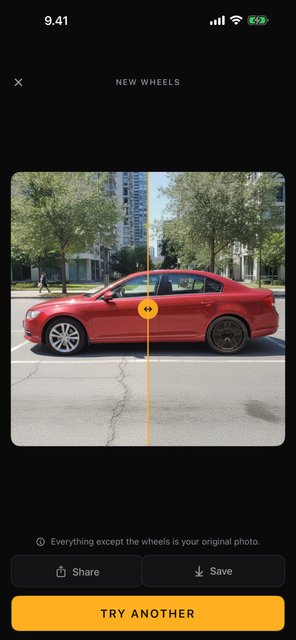
Ilmainen sovellus · Android & iPhone
Car Mods AI: Wheels & Wraps
Vanteet, teippaukset, tummennukset ja vannevärit omaan autokuvaasi — autosi pysyy täsmälleen autonasi. Kamerasta renderöintiin sekunneissa, ja aloitat 2 ilmaisella renderöinnillä — täysi laatu, ei kulmamerkkiä.
| Sovelluksessa | Android | iPhone |
|---|---|---|
| Vanteenvaihto — mikä tahansa malli | Kyllä | Kyllä |
| Teippaus & maaliväri | Kyllä | Kyllä |
| Taustamaisemat | Kyllä | Kyllä |
| Ikkunoiden tummennus | Kyllä | Kyllä |
| Vanteiden väri | Kyllä | Kyllä |
| Rekisterikilven sumennus | Kyllä | tulossa |